

3d-NOIR IS BACK! Yes, we're back in business. We were OUT of business because of spam applicants. Membership is by invitation only now, for that reason. Members may invite others through their accounts page. Want to join the discussions? Ask a member. :)
Note that everyone who WAS a member is STILL a member.
Makin' Stuff
-
Opening window and working latch? Good. Perfection, we don't expect. (That will come with experience. :) )
-
Yes, one hopes. :D
Trying to get the textures less sucky...I see why people who model are often less motivated to do texturing. After getting something to work in Poser, textures are...ugh, a whole other world of hurt.
* A child of five could understand this. Fetch me a child of five!
* Isn't it wonderful how cute weapons of mass distraction can be?
* Those are my principles. And if you don't like them, I have others. -
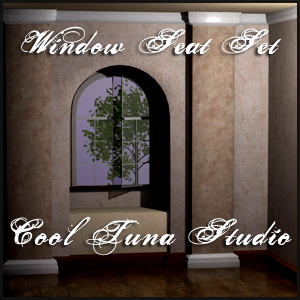
Click on the picture to get the zip.
 Window-Seat-Set.jpg300 x 300 - 62K* A child of five could understand this. Fetch me a child of five!
* Isn't it wonderful how cute weapons of mass distraction can be?
* Those are my principles. And if you don't like them, I have others. -
Shoot, I forgot the readme! Ack!
EDIT. OK, there we go.
* A child of five could understand this. Fetch me a child of five!
* Isn't it wonderful how cute weapons of mass distraction can be?
* Those are my principles. And if you don't like them, I have others. -
Woo! Nan, you rule. =^_^=
-
There is a vanishingly small probability that I'll put a texture on there other than wood or plaster... or maybe not. >.>
Maybe I'd rather make a chair or something...
No, wait. I have a boiler suit and boots to do! At least this is ONE off my to-do list that's been there for a long, long time.
* A child of five could understand this. Fetch me a child of five!
* Isn't it wonderful how cute weapons of mass distraction can be?
* Those are my principles. And if you don't like them, I have others. -
And thanks to Jim for pointing out the whole PHI-builder thing. And to Jack for his nice PDF that added to Jim's instructions. And to Jim Burton for his Hierarchy Builder thing which worked really well.
I used Prepper, but sometimes it deleted the pilasters (the rectangular columns) from the scene but not from the groups. Go figure! They were the only two things that shared the same UV map space. So I fell back on Hierarchy Builder.
Which I am only telling you about for the sake of completeness.
* A child of five could understand this. Fetch me a child of five!
* Isn't it wonderful how cute weapons of mass distraction can be?
* Those are my principles. And if you don't like them, I have others. -
Interesting repository of free plans for furniture and woodworking:
http://www.woodworkersworkshop.com/resources/index.php?cat=102* A child of five could understand this. Fetch me a child of five!
* Isn't it wonderful how cute weapons of mass distraction can be?
* Those are my principles. And if you don't like them, I have others. -
This is a fascinating little article about making an Arts and Crafts style chair--real woodworking--but the plans will be handy, too. :)
http://www.finewoodworking.com/FWNPDFfree/arts-crafts-chair.pdf
* A child of five could understand this. Fetch me a child of five!
* Isn't it wonderful how cute weapons of mass distraction can be?
* Those are my principles. And if you don't like them, I have others. -
Cool. The better for making realistic looking shapes with ones and zeros!
-
Research: every little bit helps.
* A child of five could understand this. Fetch me a child of five!
* Isn't it wonderful how cute weapons of mass distraction can be?
* Those are my principles. And if you don't like them, I have others. -
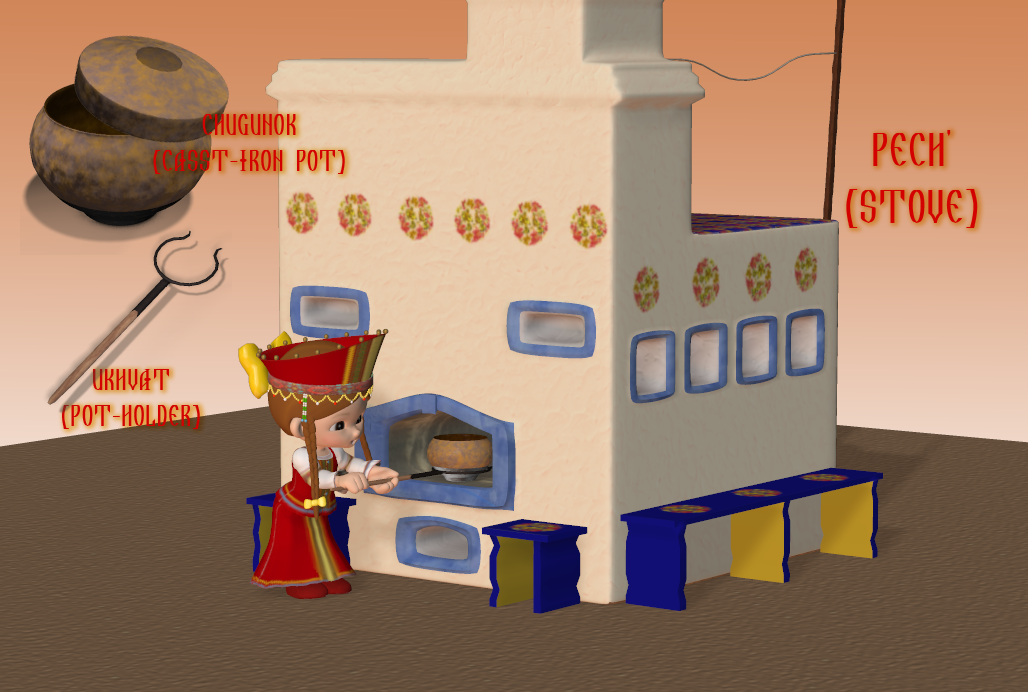
3D fun under the guise of academic research.
Oh yeah.
And guess what? I can use my stove in my current culture course! Heee!
Suspiro ergo sum. -
That is awesome, Masha. You've done a nice job on that!
* A child of five could understand this. Fetch me a child of five!
* Isn't it wonderful how cute weapons of mass distraction can be?
* Those are my principles. And if you don't like them, I have others. -
Ok, so I'm joining this thread pretty late and to save myself tons of time reading through the comments I'm just gonna plop my question out there. I'm interested in making sets from scratch, sort of giant cavernous rooms and such. What are the best programs to do this with? I've seen great worlds built in mojo, and some nice things in bryce and vue, but I want more on the style of maybe DM's stuff, or Stonemason's stuff. Any suggestions?
-
Truthfully, almost any software can be used to make stuff like Stonemason's. As I remember, he does most of his work in Modo, but there are many other software packages that can do the same thing. As far as DM, I think they're using 3DSMAX, but I don't know for sure. Either way, the answer is to settle on a package you like and can afford, then practice with it until you can do what you want.
-
Stefan (Stonemason) uses 3dsMax for a lot of his works. I don't know about DM, though. I'm learning how to model in C8 for the moment. It's all (to me) what you can afford and start from there."I didn't attend the funeral, but I sent a nice letter saying that I approved of it. " Mark Twain.
-
Hm. Here is a free modeler I was looking into as well- http://www.pixologic.com/sculptris/ I know several modlers that use it along with zBrush (it has a GoZ plug in for that use). I haven't gone indepth in looking into this one simply because I haven't had the blasted time. ;)"I didn't attend the funeral, but I sent a nice letter saying that I approved of it. " Mark Twain.
-
Actually, a middle-of-the-road modeler that will do most everything you need (shy of animation or rendering) for modeling is Silo, and it's a lot of bang for about US$160.
But you DO need a real polygon modeler if you are going to import into poser or even to Vue. Sketchup won't cut it for Poser import, since it make ugly meshes. Messes. Both.
The problem with the free ones is that you may have to rely on other programs for UV mapping--which is a BIG part of what you're doing, so you have to plan your models to create decent UV maps.
You pays your money and takes your choice. I know for certain that we have people here who use:
Modeling:
Hexagon (buggy and half-dead by now, sadly)
Silo
Modo
3DSMax
Carrara
Lightwave (Jack Tomalin--but he may or may not be available for questions)
UVmapping:
UVmapper
Roadkill
UVlayout (I think?)
Silo
Modo
Rendering and scene set-up:
Poser
Studio
Carrara
Vue Infinite
LT uses Sketchup for work, so he can answer those questions.
I don't know if anyone here uses: Maya, C4D, zBrush, Milkshape, or Blender.
* A child of five could understand this. Fetch me a child of five!
* Isn't it wonderful how cute weapons of mass distraction can be?
* Those are my principles. And if you don't like them, I have others. -
So Nan, you're saying that if I use a modeler I still need to UV map it in another program? Btw, what the heck is UV mapping anyway? Thank you so much for the outline, which is what I needed, a map or guideline of sorts to guide me on my way. Of course anything I make will be posted free here first, as a thank you.
Right now I currently have Zbrush but it was so confusing I just said nuh-huh.
-
UV-Mapping is essentially creating a skin for your model so you can put textures on it. Without a UV-map, you can't use the model in Poser, IIRC.
You shouldn't need an external program for UV-mapping, but some of us are more comfortable doing it that way. Theoretically, all of the modelers above can UV-map, but I haven't figured out how it works in Silo yet, and the combination of the free UVMapper + Roadkill works just fine for me. Nan says that Modo is easy to use for UV-mapping.
Suspiro ergo sum. -
PS: Modo seems to have a great Educational discount deal for anyone interested. I'm still taming Silo.
Suspiro ergo sum. -
You can do UV mapping in Silo, too. And you can both model and map in most of the more expensive programs, most certainly.
I think we just tried a bunch of different tools over time and just ended up using what made the most sense to us. You don't have to do it that way, of course.
Re: UV map - it "skins" or maps the vertices on a 3-dimensional surface onto a 2-d surface, a U x V space (since modeling uses X, Y, and Z.) Without it, you *can* use the models in Poser--but only flat colors, no image map textures. Very unsatisfactory state of affairs.
The general method in modeling goes sort of like this, for me (yours may vary):- Analyze your project. Look at it in terms of the shapes it's made of: You can in some modelers successfully use a subtractive method (like carving stone for a sculpture) but that leaves you with unsatisfactory and difficult-to-use results in Poser/Studio/Vue/etc. Generally, you will build out from a primitive--cube, cylinder, polygon, circle. Usually a cube or a cylinder.
- Box-modeling is a technique (as opposed to using lofted spline surfaces as you would in CAD programs--I refer you to Wikipedia for further explanation) whereby you start with the primitive and extend and subdivide it to achieve the shapes you want, the goal being to keep your shapes made up of three- and four-sided polygons only. You can have extraordinary vertices (more than 4 edges connected to it) buy keep those to a minimum. Verts with only 2 edges are a no-no as well, as are n-gons, polys with more than one side. This is because the "bad" polys do not render well, frankly, and do not bend well in rigged models, either.
Basically, you have to get used to solving the geometry problem of your model visually. Clothing starts off as a box or cylinder around a figure's mid-section, which is then extended as needed to arms & legs, etc. Rooms are very similar, although you're generally not trying to follow an underlying geometry (which has its own charms). With architecture and furnishings, you must follow all the same rules that architects and cabinet-makers do, and create something sized to the figures who will inhabit that space.
Subdivision is how you get smooth, even surfaces with sufficient geometry (#s of polys) to do what needs to be done. Each program has its own way of doing that--but it's at the core of getting an organic or curvilinear model that works. The program divides every polygon into four for 1 level of subdivision. Usually there is a sort of "trial" sub-d and then the real refinement of the mesh into more actual polys. Silo makes about the most sense of this that I've seen. Modo does some very fancy sub-d--including the Pixar subdivision blah blah blah. Ignore that--Poser can't use it. Studio *does* use Catmull-Clark, but it's the only one other than the big packages like Maya, etc.etc. - You may have one or more meshes--separate islands of polygons--in your model. This is fine. Once component like this is mostly shaped, UV map it. Then move on and continue modeling.
Because you want people to be able to easily texture your goodies, they must be built so that the UV maps--like animal pelts or flattened-out boxes--are not distorted. This is another reason for box modeling--you get nice UV maps that way.
UV mapping is its own little discipline. It's about making a series of choices, like how to peel and orange, in the way that gets you the fewest, largest and least distorted bits when you're done. - When UV maps are made and the mesh is as done as you can make it (there may be bits you have to do over, of course) you can export it to .obj format and save the UV template.
- Here is where clothing for rigged figures, dynamic objects, and sets begin to significantly differ: What you do after you model, to prep it for use, varies depending upon the model's end use.
- For sets that you want to be CR2s--as I discovered recently--you have to add in the step of composing the Poser hierarchy file (PHI file), texturing, and then importing and converting to a CR2.
- For rigged conforming clothing, after UV mapping, you must group, import, and rig the mesh using a donor CR2. And texturing it.
- For dynamic items, you import it to Poser and set up the simulation and then spend time getting that right and texturing it.
* A child of five could understand this. Fetch me a child of five!
* Isn't it wonderful how cute weapons of mass distraction can be?
* Those are my principles. And if you don't like them, I have others. -
Simple props are the easiest things--you import them, apply the materials, parent them (if necessary) and away you go.
* A child of five could understand this. Fetch me a child of five!
* Isn't it wonderful how cute weapons of mass distraction can be?
* Those are my principles. And if you don't like them, I have others. -
Actually... Danie/Marforno just released a "Priestess Sanctuary" set. Interesting study in making a set, that. They are very good at making sets that can be used from more than one angle--and their style is distinctive, now.
If you got the set--pull it into a modeler and take a look at what they did. Not to copy (that's a no-no) but to examine for technique. Do they bevel edges? How do the various pieces look from a mesh view?
By the way, the poses they ship with their sets are really excellent, but the sets are so impressive and decorative that hardly anyone realizes that, it would seem.
* A child of five could understand this. Fetch me a child of five!
* Isn't it wonderful how cute weapons of mass distraction can be?
* Those are my principles. And if you don't like them, I have others. -
I use their poses a lot, at least for starters, if not as-is. They are good. Mix-and-match between sets, too.
Suspiro ergo sum. -
Oh yes I love the poses that comes with the sets. I have most of their stuff, and what I really like is their v4 poses can generally also be used for m4 as well with just some slight tinkering!So far this is a loooot of info to sink in, but I think that now you have pointed me in the right way I can start learning. Thank you guys so much for the help!
-
Yes, modeling is a bit of a heavy lift to start with, moreso than learning to use models in Poser or Studio. If you get stuck, holler. It's very easy to get discouraged at first, but you shouldn't.
* A child of five could understand this. Fetch me a child of five!
* Isn't it wonderful how cute weapons of mass distraction can be?
* Those are my principles. And if you don't like them, I have others. -
I have an issue that I need assistance with. I went to DAZ and got limited feedback, went to Smith Micro and couldn't be helped. I'm just going to copy/paste my question over from the DAZ forum and maybe you lovlies can help. ><""
I first tried to load it into a pre-existing model that I wanted to detail with the morphs...it didn't work. The model already has Morph++, by the way. The only dial that shows up is 'Wiry' and when I try to fiddle with that dial his head balloons. =__=U
THEN I open up a new scene, new M4 figure, inject Morph++, then inject the Muscle Morph and nothing happens. I end up with the same 'Wiry' head ballooning issue. So I figure I have to add them one-by-one. I do so and when I enter a number it poses the model in some weird way; example: Injected external obliques and when I enter a number his torso twists and I can't undo it unless I zero the previously entered value.
Response from DAZ: To rerun the initialization: double-click on
"runtime:libraries:!DAZ:DzCreateExPFiles-M4.bat"
It'll open a command window, run through each morph, and then close automatically when finished. If the initialization hangs, reinstall the appropriate figure: base first, then morphs++, then other morph packs. If it closes by itself you don't need to reinstall anything.
I followed those instructions, but they got me nowhere.
<<Nano edited this for readability>>
ladyfur: 'in your easter bonnet, with mandrakes all upon it, you'll be the faeriest fella in the easter parade...' -
Well, I would have said you need to update the base figure as well. Yes, I've had that happen! Crazy!
It would not hurt to reinstall M4 and his packs, in case something got munged.
You can navigate through your file system to Runtime - Libraries - !DAZ and uh...there's an EXPfiles something M4.bat file there. Ack, I'm trying to do this from memory... Well, you just double-click on it there in its own directory and that little DOS scriptie should go and update things.
**Frankly, using their shortcut from the desktop sometimes does not work! Go navigate to the folder where the .bat file lives and invoke it from there.**
Now go and load the (refreshed) Base M4. Now go INJ the Base morphs and then the ++ morphs, Enhanced, Muscles, Elite, Ethnic, F4, whatever.
Save that figure as a CR2 file to you own folder in Characters for future reference.
Now try to INJ the character into the newly updated base with the required morphs.
I believe the order in which you do it is important.
* A child of five could understand this. Fetch me a child of five!
* Isn't it wonderful how cute weapons of mass distraction can be?
* Those are my principles. And if you don't like them, I have others. -
Ok so now I have a question since Puffle's on topic, I'm getting tired of having to recycle the same scenes just to be able to use the characters I make in them. How do I save the characters by themselves so later I can load them all into one scene, with my special skin settings and textures? I use Daz so maybe Poser pros might not can help, and that's ok. But any info will be mucho appreciated!
-
Oh shoot. I'm a Poser user, useless here. I have no idea if any versions of Studio let you save CR2 files into a library! I recall they did not, for some damn reason. Never have understood that.
Angelus Prime has used Studio quite a bit; Wayii does, too, but only the older version. Don't know who else might know!
* A child of five could understand this. Fetch me a child of five!
* Isn't it wonderful how cute weapons of mass distraction can be?
* Those are my principles. And if you don't like them, I have others. -
Well I use Studio 3, which seems to be the most commonly used version of D/S since Studio 4 jumped the shark. Thanks though, I just know it's so frustrating, and I see you use so many of your guys in the same scenes so was wondering if you do it like me, where you delete everything in the scene after you've rendered it and done, and go back to scratch save for your character, or if you have a preset made.
-
I suggest PMing AP. She uses D/S3 and has designed her own characters as far as I can tell. She just isn't in very often. Wayii uses D/S2. I think Surocheck has 3.
-
Oh dear! I'm a Poser Pro 2012 user. Probably not what you wanted to hear.
 So I can save CR2 files into a Characters library. And characters as morph or mat poses...
Yes, you'd have to have empty files but for your characters, and fake a CR2 file that way. I'm terribly sorry. I have *no* idea why Studio has never saved CR2 files. That has never made sense to me.
* A child of five could understand this. Fetch me a child of five!
* Isn't it wonderful how cute weapons of mass distraction can be?
* Those are my principles. And if you don't like them, I have others. -
Studio doesn't save CR2 files natively. I *think* there may be plugins for that, but I'm not sure. I never bought one, and then I switched to Poser.
Suspiro ergo sum. -
@CelticfireI was a DAZ user up until two months ago. I have no clue how to save a model I just had separate files of all my characters so that if I needed one I'd just 'merge' the file with with any current one I was working with. Like...I'd make a model complete with hair and clothing then save it as AndaereanBase or whatever the characters name is. That worked best for me as far as saving all their settings and whatnots.And theeeeen...*Runs off to try what Nano suggested* o3oladyfur: 'in your easter bonnet, with mandrakes all upon it, you'll be the faeriest fella in the easter parade...'
-
OOOOH, ok how do you do that Puffle?
-
I always just saved scenes consisting solely of the character, hair/horns, any permanent jewelry and (in the case of my Mandos) any obligatory armor.
Then somewhere along the way, I ended up getting the old DS dev tools for 1.99 and eventually figured out they had an export as .cr2 feature in them -- which is great (though I have to set up all the hair and crap over again) to have those characters usable in Poser -- which doesn't take Daz scene files.
This is all old DS2.3 stuff, mind you, as I found DS3 and 4 about as useful as teats on a turtle.
-
I think I got most of the advanced tools for DS3 for half the PC price... just before DAZ went nuts over DS4 and I switched to Poser. So I never actually learned to use them. :(
Heh.
Suspiro ergo sum. -
Haha it's ok, I have a notebook that I'm keeping all my character formulas written down in for now. Was just looking for an easier way to do it
-
There's something you have to buy and install that can actually save your own characters and character morphs. It makes whatever you want into a tab in your content folder. I'm all for free stuff, so I never looked into it anymore than that. :/I also just copy paste the vaules in the parameter tab so if I -did- loose the charater files, I'd have something to come back to.ladyfur: 'in your easter bonnet, with mandrakes all upon it, you'll be the faeriest fella in the easter parade...'
-
Hi CelticFire
As others have suggested you can create a scene with just your character in, save it then 'merge' it into other scenes. I do this this if I want to save hair and clothing with the character.
However, if you just want to save the morphs and the textures then you select your character in the scene, then File>SaveAs>Character preset. This gives you a little popup box and you can then choose what and where to save.
If you're using D3 this creates a file you can apply as any 'materials' setting to a 'new' figure. If you're using D4 then it automatically creates a character preset file which can be found under the 'Unassigned' category.
Incidently, you can also use this save method just to save a pose, a shape (i.e. morphs D4 only), or just the materials (i.e textures). Saving as character saves the morphs, pose and textures so be sure to save morphs only (not transforms) or have a zero figure pose before you save.
Hope you can follow this. Please ask if you don't understand my convoluted explanation :)
BTW this is just a standard feature of DAZ, no plugins required!
AND if you want to save as a CR2 file then you have to choose export from the file menu, and choose save as CR2 format.
-
You can save as a character preset. I do it all the time after getting the model fixed as I like it. I tend to do it with just the base with no clothing, hair, ect so it's quicker to merge with whatever else I am using. You can use the PFE exporter to make your own inj/rem files for just the morphs as well in DS3 (which I use, and am using DS4 as well now). There are more than a few ways to skin a cat in that program if you need too."I didn't attend the funeral, but I sent a nice letter saying that I approved of it. " Mark Twain.




Howdy, Stranger!
It looks like you're new here. If you want to get involved, click one of these buttons!